> ## Documentation Index
> Fetch the complete documentation index at: https://hanzla.dev/llms.txt
> Use this file to discover all available pages before exploring further.
# Orchestrating Multiple Services with Kubernetes
> How Kubernetes manages, networks, and scales all microservices in our event-driven blog application — from Pods to Ingress
Code : [https://github.com/hanzladevofficial/micro-services](https://github.com/hanzladevofficial/micro-services)
## What is Kubernetes?
When you have multiple Docker containers running as independent services, you need something to manage them — restarting crashed containers, routing traffic between them, and making sure the right number of instances are always running. That's exactly what **Kubernetes (K8s)** does.
Think of Docker as the technology that *packages* your service into a container, and Kubernetes as the platform that *runs, manages, and connects* those containers at scale.
Without Kubernetes, running 6 microservices means manually starting each container, hardcoding IPs that change on every restart, and hoping nothing crashes. With Kubernetes, you declare the **desired state** of your system and it continuously works to maintain it — automatically.
***
## Our Cluster in Action
After applying all Kubernetes configurations, here's what the dashboard looks like with all 6 services healthy and running:
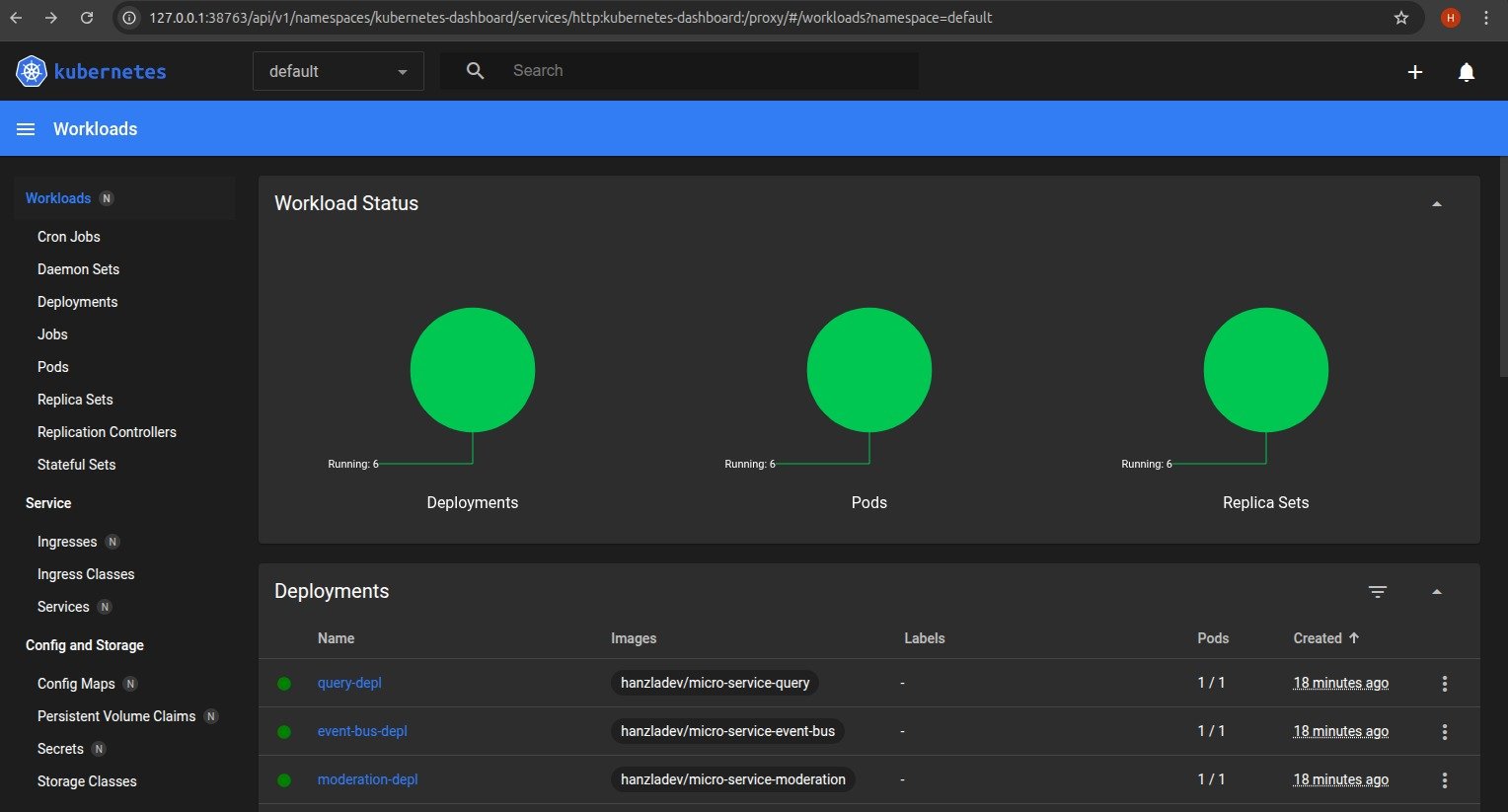 Every circle is green — meaning all **6 Deployments**, **6 Pods**, and **6 Replica Sets** are running successfully. This is our entire blog application — posts, comments, query, moderation, event-bus, and client — all orchestrated by Kubernetes in the `default` namespace.
***
## Services We're Orchestrating
Before diving into Kubernetes concepts, here's what we're actually running:
| Service | Port | Purpose |
| ------------------ | ---- | ---------------------------------------- |
| Posts Service | 4000 | Create and store blog posts |
| Comments Service | 4001 | Create and manage comments |
| Query Service | 4002 | Aggregated read model for the frontend |
| Moderation Service | 4003 | Auto-moderate comments for banned words |
| Event Bus Service | 4005 | Central hub for async event broadcasting |
| Client Service | 3000 | React frontend |
Each of these is an independent Node.js/Express app, containerized with Docker, and pushed to Docker Hub. Kubernetes pulls those images and runs them as pods.
***
## Core Kubernetes Concepts
### Pods
A **Pod** is the smallest deployable unit in Kubernetes. Each pod wraps one container — one service. Pods are **ephemeral**, meaning they can die and be recreated at any time. Because of this, you never rely on a pod's IP address directly — it changes every time the pod restarts.
This is the problem that Services (ClusterIP) solve, which we'll cover next.
### Deployments
A **Deployment** tells Kubernetes *how* to run a pod — which Docker image to use, how many replicas to maintain, and what to do when you push an update. Each of our 6 services has its own deployment YAML file under `infra/k8s/`.
Here's the deployment config for the Posts Service:
```yaml theme={null}
apiVersion: apps/v1
kind: Deployment
metadata:
name: posts-depl
spec:
replicas: 1
selector:
matchLabels:
app: posts
template:
metadata:
labels:
app: posts
spec:
containers:
- name: posts
image: hanzladev/micro-service-posts
imagePullPolicy: Always
```
Two things worth noting here:
* `replicas: 1` — we're running one instance of each service. In production you'd increase this for high availability.
* `imagePullPolicy: Always` — Kubernetes always pulls the latest image from Docker Hub on every pod restart. This is critical during development so your changes are always reflected.
If a pod crashes, the Deployment controller notices the actual state (0 running) doesn't match the desired state (1 running) and immediately spins up a new pod. This is **self-healing**.
### Services (ClusterIP)
Since pod IPs change on every restart, Kubernetes **Services** provide a stable DNS name that always routes to the correct pod — regardless of how many times it's been recreated.
We use **ClusterIP** services, which means they're only accessible *inside* the cluster. This is what enables our microservices to talk to each other securely by name:
| DNS Name | Points To | Port |
| ---------------- | ------------------ | ---- |
| `posts-srv` | Posts Service | 4000 |
| `comments-srv` | Comments Service | 4001 |
| `query-srv` | Query Service | 4002 |
| `moderation-srv` | Moderation Service | 4003 |
| `event-bus-srv` | Event Bus Service | 4005 |
| `client-srv` | Client (React) | 3000 |
So instead of `http://10.108.42.7:4005/events` (which would break on restart), the event bus is always reachable at `http://event-bus-srv:4005/events`. Clean, stable, and Kubernetes handles the DNS resolution automatically.
Here's what a combined Deployment + ClusterIP Service config looks like:
```yaml theme={null}
apiVersion: apps/v1
kind: Deployment
metadata:
name: event-bus-depl
spec:
replicas: 1
selector:
matchLabels:
app: event-bus
template:
metadata:
labels:
app: event-bus
spec:
containers:
- name: event-bus
image: hanzladev/micro-service-event-bus
imagePullPolicy: Always
---
apiVersion: v1
kind: Service
metadata:
name: event-bus-srv
spec:
selector:
app: event-bus
ports:
- name: event-bus
protocol: TCP
port: 4005
targetPort: 4005
```
The `selector: app: event-bus` is what links the Service to the correct pod — it's a label-based lookup that Kubernetes resolves automatically.
### Ingress (NGINX)
ClusterIP services are internal only — the browser can't reach them directly. **Ingress** is the single entry point for all external HTTP traffic. It acts as a reverse proxy, inspecting the incoming URL path and routing to the correct internal service.
We use the **NGINX Ingress Controller** with the following routing rules under the `posts.com` host:
```yaml theme={null}
apiVersion: networking.k8s.io/v1
kind: Ingress
metadata:
name: ingress-srv
annotations:
nginx.ingress.kubernetes.io/use-regex: "true"
spec:
ingressClassName: nginx
rules:
- host: posts.com
http:
paths:
- path: /posts/create
pathType: Prefix
backend:
service:
name: posts-srv
port:
number: 4000
- path: /posts/(.*)/comments
pathType: ImplementationSpecific
backend:
service:
name: comments-srv
port:
number: 4001
- path: /posts
pathType: Prefix
backend:
service:
name: query-srv
port:
number: 4002
- path: /
pathType: Prefix
backend:
service:
name: client-srv
port:
number: 3000
```
What this means in practice:
* `posts.com/posts/create` → Posts Service
* `posts.com/posts/abc123/comments` → Comments Service
* `posts.com/posts` → Query Service (read all posts)
* `posts.com/` → React Client
The frontend only ever talks to one domain. It has no idea there are 6 independent services behind it — that's the **API Gateway pattern** in action.
***
## Docker Images on Docker Hub
Each service is built into a Docker image and pushed to Docker Hub before Kubernetes can pull and run it. Our images:
```
hanzladev/micro-service-posts
hanzladev/micro-service-comments
hanzladev/micro-service-query
hanzladev/micro-service-moderation
hanzladev/micro-service-event-bus
hanzladev/micro-service-client
```
Each service's Dockerfile uses `node:20-alpine` as the base image — lightweight and fast to pull:
```dockerfile theme={null}
FROM node:20-alpine
WORKDIR /app
COPY package.json ./
RUN npm install
COPY . .
CMD ["node", "index.js"]
```
***
## Deployment Flow
Here's the full lifecycle of pushing a code change to a running pod:
```
Code Change
↓
docker build -t hanzladev/micro-service-posts .
↓
docker push hanzladev/micro-service-posts
↓
kubectl rollout restart deployment/posts-depl
↓
Kubernetes pulls latest image from Docker Hub
↓
Old pod terminates → New pod starts with updated image
↓
ClusterIP Service routes traffic to new pod
```
No downtime. No manual SSH into servers. No managing processes. Kubernetes handles the rolling update and traffic rerouting automatically.
***
## Full Architecture — How Everything Works Together
```
User Browser
↓
Ingress (posts.com) — NGINX routes by path
↓
┌─────────────────────────────────────────┐
│ Client Service (React) │
│ Port 3000 │
└─────────────────────────────────────────┘
↓ ↓
Posts Service Comments Service
Port 4000 Port 4001
↓ ↓
Event Bus Service
Port 4005
↓
┌────────────┴────────────┐
↓ ↓
Query Service Moderation Service
Port 4002 Port 4003
```
### Request Flow: Creating a Comment
This is the most complex flow in the system — it touches 5 of the 6 services:
1. User submits a comment in the React client
2. Client → Ingress → **Comments Service** `POST /posts/:id/comments`
3. Comments Service creates comment with status `pending`
4. Comments Service emits `CommentCreated` → **Event Bus**
5. Event Bus broadcasts to all services
6. **Moderation Service** receives `CommentCreated`, checks for banned words
7. Moderation emits `CommentModerated` (approved/rejected) → **Event Bus**
8. Event Bus broadcasts to all services
9. **Comments Service** receives `CommentModerated`, updates comment status
10. Comments Service emits `CommentUpdated` → **Event Bus**
11. **Query Service** receives `CommentUpdated`, updates its aggregated data store
12. Client re-fetches from Query Service and renders the updated comment
### Event Types Reference
| Event | Emitted By | Consumed By | Purpose |
| ------------------ | ------------------ | ----------------- | ------------------------ |
| `PostCreated` | Posts Service | Query Service | Notify about new post |
| `CommentCreated` | Comments Service | Query, Moderation | Notify about new comment |
| `CommentModerated` | Moderation Service | Comments Service | Send moderation result |
| `CommentUpdated` | Comments Service | Query Service | Notify status change |
***
## Why the Query Service Exists
In a naive microservices setup, the frontend would need to call the Posts Service for posts, then loop through each post and call the Comments Service for comments. That's N+1 network requests — and if *either* service is down, the whole page breaks.
The **Query Service** solves this by listening to all events and maintaining a denormalized, pre-aggregated view of the data:
```javascript theme={null}
{
"post-id-1": {
id: "post-id-1",
title: "My First Post",
comments: [
{ id: "comment-id-1", content: "Great post!", status: "approved" },
{ id: "comment-id-2", content: "orange", status: "rejected" }
]
}
}
```
The frontend makes **one single request** to `GET /posts` and gets everything it needs. This is the **CQRS pattern** (Command Query Responsibility Segregation) — separate services for writing data vs reading data.
### Event Sourcing on Restart
When the Query Service restarts, it loses its in-memory data. To recover, it calls `GET /events` on the Event Bus which returns the full event history, and replays every event to rebuild its state from scratch. This is **event sourcing** — the event log is the source of truth, not the service's local state.
***
## Getting Started
### Prerequisites
* Docker Desktop installed (with Kubernetes enabled)
* `kubectl` CLI tool
* NGINX Ingress Controller installed
### Setup Steps
**1. Build and push all Docker images:**
```bash theme={null}
docker build -t hanzladev/micro-service-posts ./posts
docker push hanzladev/micro-service-posts
# Repeat for comments, query, moderation, event-bus, client
```
**2. Apply all Kubernetes configs in one command:**
```bash theme={null}
kubectl apply -f infra/k8s/
```
**3. Add `posts.com` to your hosts file:**
On Linux/Mac, edit `/etc/hosts`. On Windows, edit `C:\Windows\System32\drivers\etc\hosts`:
```
127.0.0.1 posts.com
```
**4. Open the app:**
Navigate to `http://posts.com` in your browser.
***
## Key Concepts Summary
| Concept | What It Does | Why We Need It |
| --------------------- | ----------------------------------- | -------------------------------- |
| **Pod** | Runs one container | Smallest deployable unit |
| **Deployment** | Manages pod lifecycle + replicas | Self-healing, rolling updates |
| **ClusterIP Service** | Stable DNS name for pods | Pods change IPs on restart |
| **Ingress** | Routes external traffic by URL path | Single entry point for the app |
| **Event Bus** | Broadcasts events to all services | Loose coupling between services |
| **Query Service** | Aggregated read model | Avoid N+1 requests from frontend |
| **Event Sourcing** | Rebuild state from event history | Survive service restarts |
***
## What This Is Not (Yet)
This is a **learning project** built to understand microservices fundamentals. In a production system you'd add:
* Persistent databases (MongoDB, PostgreSQL) instead of in-memory storage
* A proper message broker (NATS, RabbitMQ, Kafka) instead of the custom event bus
* Authentication and authorization across services
* Distributed tracing (Jaeger, Zipkin) to debug cross-service flows
* Monitoring and alerting (Prometheus, Grafana)
* CI/CD pipeline for automated builds and deployments
* Multiple replicas per service for true high availability
Run `kubectl get pods` to check the live status of all pods. All 6 should show `Running` with `1/1` ready. Use `kubectl logs ` to debug any service that isn't behaving as expected.
Don't forget to add `127.0.0.1 posts.com` to your hosts file — without this your browser can't resolve the domain to your local Kubernetes cluster and you'll get a "site can't be reached" error.
The moderation service rejects any comment containing the word **"orange"** — this is intentionally simplified. In a real system you'd call an external moderation API or run an ML model here instead.
Every circle is green — meaning all **6 Deployments**, **6 Pods**, and **6 Replica Sets** are running successfully. This is our entire blog application — posts, comments, query, moderation, event-bus, and client — all orchestrated by Kubernetes in the `default` namespace.
***
## Services We're Orchestrating
Before diving into Kubernetes concepts, here's what we're actually running:
| Service | Port | Purpose |
| ------------------ | ---- | ---------------------------------------- |
| Posts Service | 4000 | Create and store blog posts |
| Comments Service | 4001 | Create and manage comments |
| Query Service | 4002 | Aggregated read model for the frontend |
| Moderation Service | 4003 | Auto-moderate comments for banned words |
| Event Bus Service | 4005 | Central hub for async event broadcasting |
| Client Service | 3000 | React frontend |
Each of these is an independent Node.js/Express app, containerized with Docker, and pushed to Docker Hub. Kubernetes pulls those images and runs them as pods.
***
## Core Kubernetes Concepts
### Pods
A **Pod** is the smallest deployable unit in Kubernetes. Each pod wraps one container — one service. Pods are **ephemeral**, meaning they can die and be recreated at any time. Because of this, you never rely on a pod's IP address directly — it changes every time the pod restarts.
This is the problem that Services (ClusterIP) solve, which we'll cover next.
### Deployments
A **Deployment** tells Kubernetes *how* to run a pod — which Docker image to use, how many replicas to maintain, and what to do when you push an update. Each of our 6 services has its own deployment YAML file under `infra/k8s/`.
Here's the deployment config for the Posts Service:
```yaml theme={null}
apiVersion: apps/v1
kind: Deployment
metadata:
name: posts-depl
spec:
replicas: 1
selector:
matchLabels:
app: posts
template:
metadata:
labels:
app: posts
spec:
containers:
- name: posts
image: hanzladev/micro-service-posts
imagePullPolicy: Always
```
Two things worth noting here:
* `replicas: 1` — we're running one instance of each service. In production you'd increase this for high availability.
* `imagePullPolicy: Always` — Kubernetes always pulls the latest image from Docker Hub on every pod restart. This is critical during development so your changes are always reflected.
If a pod crashes, the Deployment controller notices the actual state (0 running) doesn't match the desired state (1 running) and immediately spins up a new pod. This is **self-healing**.
### Services (ClusterIP)
Since pod IPs change on every restart, Kubernetes **Services** provide a stable DNS name that always routes to the correct pod — regardless of how many times it's been recreated.
We use **ClusterIP** services, which means they're only accessible *inside* the cluster. This is what enables our microservices to talk to each other securely by name:
| DNS Name | Points To | Port |
| ---------------- | ------------------ | ---- |
| `posts-srv` | Posts Service | 4000 |
| `comments-srv` | Comments Service | 4001 |
| `query-srv` | Query Service | 4002 |
| `moderation-srv` | Moderation Service | 4003 |
| `event-bus-srv` | Event Bus Service | 4005 |
| `client-srv` | Client (React) | 3000 |
So instead of `http://10.108.42.7:4005/events` (which would break on restart), the event bus is always reachable at `http://event-bus-srv:4005/events`. Clean, stable, and Kubernetes handles the DNS resolution automatically.
Here's what a combined Deployment + ClusterIP Service config looks like:
```yaml theme={null}
apiVersion: apps/v1
kind: Deployment
metadata:
name: event-bus-depl
spec:
replicas: 1
selector:
matchLabels:
app: event-bus
template:
metadata:
labels:
app: event-bus
spec:
containers:
- name: event-bus
image: hanzladev/micro-service-event-bus
imagePullPolicy: Always
---
apiVersion: v1
kind: Service
metadata:
name: event-bus-srv
spec:
selector:
app: event-bus
ports:
- name: event-bus
protocol: TCP
port: 4005
targetPort: 4005
```
The `selector: app: event-bus` is what links the Service to the correct pod — it's a label-based lookup that Kubernetes resolves automatically.
### Ingress (NGINX)
ClusterIP services are internal only — the browser can't reach them directly. **Ingress** is the single entry point for all external HTTP traffic. It acts as a reverse proxy, inspecting the incoming URL path and routing to the correct internal service.
We use the **NGINX Ingress Controller** with the following routing rules under the `posts.com` host:
```yaml theme={null}
apiVersion: networking.k8s.io/v1
kind: Ingress
metadata:
name: ingress-srv
annotations:
nginx.ingress.kubernetes.io/use-regex: "true"
spec:
ingressClassName: nginx
rules:
- host: posts.com
http:
paths:
- path: /posts/create
pathType: Prefix
backend:
service:
name: posts-srv
port:
number: 4000
- path: /posts/(.*)/comments
pathType: ImplementationSpecific
backend:
service:
name: comments-srv
port:
number: 4001
- path: /posts
pathType: Prefix
backend:
service:
name: query-srv
port:
number: 4002
- path: /
pathType: Prefix
backend:
service:
name: client-srv
port:
number: 3000
```
What this means in practice:
* `posts.com/posts/create` → Posts Service
* `posts.com/posts/abc123/comments` → Comments Service
* `posts.com/posts` → Query Service (read all posts)
* `posts.com/` → React Client
The frontend only ever talks to one domain. It has no idea there are 6 independent services behind it — that's the **API Gateway pattern** in action.
***
## Docker Images on Docker Hub
Each service is built into a Docker image and pushed to Docker Hub before Kubernetes can pull and run it. Our images:
```
hanzladev/micro-service-posts
hanzladev/micro-service-comments
hanzladev/micro-service-query
hanzladev/micro-service-moderation
hanzladev/micro-service-event-bus
hanzladev/micro-service-client
```
Each service's Dockerfile uses `node:20-alpine` as the base image — lightweight and fast to pull:
```dockerfile theme={null}
FROM node:20-alpine
WORKDIR /app
COPY package.json ./
RUN npm install
COPY . .
CMD ["node", "index.js"]
```
***
## Deployment Flow
Here's the full lifecycle of pushing a code change to a running pod:
```
Code Change
↓
docker build -t hanzladev/micro-service-posts .
↓
docker push hanzladev/micro-service-posts
↓
kubectl rollout restart deployment/posts-depl
↓
Kubernetes pulls latest image from Docker Hub
↓
Old pod terminates → New pod starts with updated image
↓
ClusterIP Service routes traffic to new pod
```
No downtime. No manual SSH into servers. No managing processes. Kubernetes handles the rolling update and traffic rerouting automatically.
***
## Full Architecture — How Everything Works Together
```
User Browser
↓
Ingress (posts.com) — NGINX routes by path
↓
┌─────────────────────────────────────────┐
│ Client Service (React) │
│ Port 3000 │
└─────────────────────────────────────────┘
↓ ↓
Posts Service Comments Service
Port 4000 Port 4001
↓ ↓
Event Bus Service
Port 4005
↓
┌────────────┴────────────┐
↓ ↓
Query Service Moderation Service
Port 4002 Port 4003
```
### Request Flow: Creating a Comment
This is the most complex flow in the system — it touches 5 of the 6 services:
1. User submits a comment in the React client
2. Client → Ingress → **Comments Service** `POST /posts/:id/comments`
3. Comments Service creates comment with status `pending`
4. Comments Service emits `CommentCreated` → **Event Bus**
5. Event Bus broadcasts to all services
6. **Moderation Service** receives `CommentCreated`, checks for banned words
7. Moderation emits `CommentModerated` (approved/rejected) → **Event Bus**
8. Event Bus broadcasts to all services
9. **Comments Service** receives `CommentModerated`, updates comment status
10. Comments Service emits `CommentUpdated` → **Event Bus**
11. **Query Service** receives `CommentUpdated`, updates its aggregated data store
12. Client re-fetches from Query Service and renders the updated comment
### Event Types Reference
| Event | Emitted By | Consumed By | Purpose |
| ------------------ | ------------------ | ----------------- | ------------------------ |
| `PostCreated` | Posts Service | Query Service | Notify about new post |
| `CommentCreated` | Comments Service | Query, Moderation | Notify about new comment |
| `CommentModerated` | Moderation Service | Comments Service | Send moderation result |
| `CommentUpdated` | Comments Service | Query Service | Notify status change |
***
## Why the Query Service Exists
In a naive microservices setup, the frontend would need to call the Posts Service for posts, then loop through each post and call the Comments Service for comments. That's N+1 network requests — and if *either* service is down, the whole page breaks.
The **Query Service** solves this by listening to all events and maintaining a denormalized, pre-aggregated view of the data:
```javascript theme={null}
{
"post-id-1": {
id: "post-id-1",
title: "My First Post",
comments: [
{ id: "comment-id-1", content: "Great post!", status: "approved" },
{ id: "comment-id-2", content: "orange", status: "rejected" }
]
}
}
```
The frontend makes **one single request** to `GET /posts` and gets everything it needs. This is the **CQRS pattern** (Command Query Responsibility Segregation) — separate services for writing data vs reading data.
### Event Sourcing on Restart
When the Query Service restarts, it loses its in-memory data. To recover, it calls `GET /events` on the Event Bus which returns the full event history, and replays every event to rebuild its state from scratch. This is **event sourcing** — the event log is the source of truth, not the service's local state.
***
## Getting Started
### Prerequisites
* Docker Desktop installed (with Kubernetes enabled)
* `kubectl` CLI tool
* NGINX Ingress Controller installed
### Setup Steps
**1. Build and push all Docker images:**
```bash theme={null}
docker build -t hanzladev/micro-service-posts ./posts
docker push hanzladev/micro-service-posts
# Repeat for comments, query, moderation, event-bus, client
```
**2. Apply all Kubernetes configs in one command:**
```bash theme={null}
kubectl apply -f infra/k8s/
```
**3. Add `posts.com` to your hosts file:**
On Linux/Mac, edit `/etc/hosts`. On Windows, edit `C:\Windows\System32\drivers\etc\hosts`:
```
127.0.0.1 posts.com
```
**4. Open the app:**
Navigate to `http://posts.com` in your browser.
***
## Key Concepts Summary
| Concept | What It Does | Why We Need It |
| --------------------- | ----------------------------------- | -------------------------------- |
| **Pod** | Runs one container | Smallest deployable unit |
| **Deployment** | Manages pod lifecycle + replicas | Self-healing, rolling updates |
| **ClusterIP Service** | Stable DNS name for pods | Pods change IPs on restart |
| **Ingress** | Routes external traffic by URL path | Single entry point for the app |
| **Event Bus** | Broadcasts events to all services | Loose coupling between services |
| **Query Service** | Aggregated read model | Avoid N+1 requests from frontend |
| **Event Sourcing** | Rebuild state from event history | Survive service restarts |
***
## What This Is Not (Yet)
This is a **learning project** built to understand microservices fundamentals. In a production system you'd add:
* Persistent databases (MongoDB, PostgreSQL) instead of in-memory storage
* A proper message broker (NATS, RabbitMQ, Kafka) instead of the custom event bus
* Authentication and authorization across services
* Distributed tracing (Jaeger, Zipkin) to debug cross-service flows
* Monitoring and alerting (Prometheus, Grafana)
* CI/CD pipeline for automated builds and deployments
* Multiple replicas per service for true high availability
Run `kubectl get pods` to check the live status of all pods. All 6 should show `Running` with `1/1` ready. Use `kubectl logs ` to debug any service that isn't behaving as expected.
Don't forget to add `127.0.0.1 posts.com` to your hosts file — without this your browser can't resolve the domain to your local Kubernetes cluster and you'll get a "site can't be reached" error.
The moderation service rejects any comment containing the word **"orange"** — this is intentionally simplified. In a real system you'd call an external moderation API or run an ML model here instead.