
What is Kubernetes?
When you have multiple Docker containers running as independent services, you need something to manage them — restarting crashed containers, routing traffic between them, and making sure the right number of instances are always running. That’s exactly what Kubernetes (K8s) does. Think of Docker as the technology that packages your service into a container, and Kubernetes as the platform that runs, manages, and connects those containers at scale. Without Kubernetes, running 6 microservices means manually starting each container, hardcoding IPs that change on every restart, and hoping nothing crashes. With Kubernetes, you declare the desired state of your system and it continuously works to maintain it — automatically.Our Cluster in Action
After applying all Kubernetes configurations, here’s what the dashboard looks like with all 6 services healthy and running: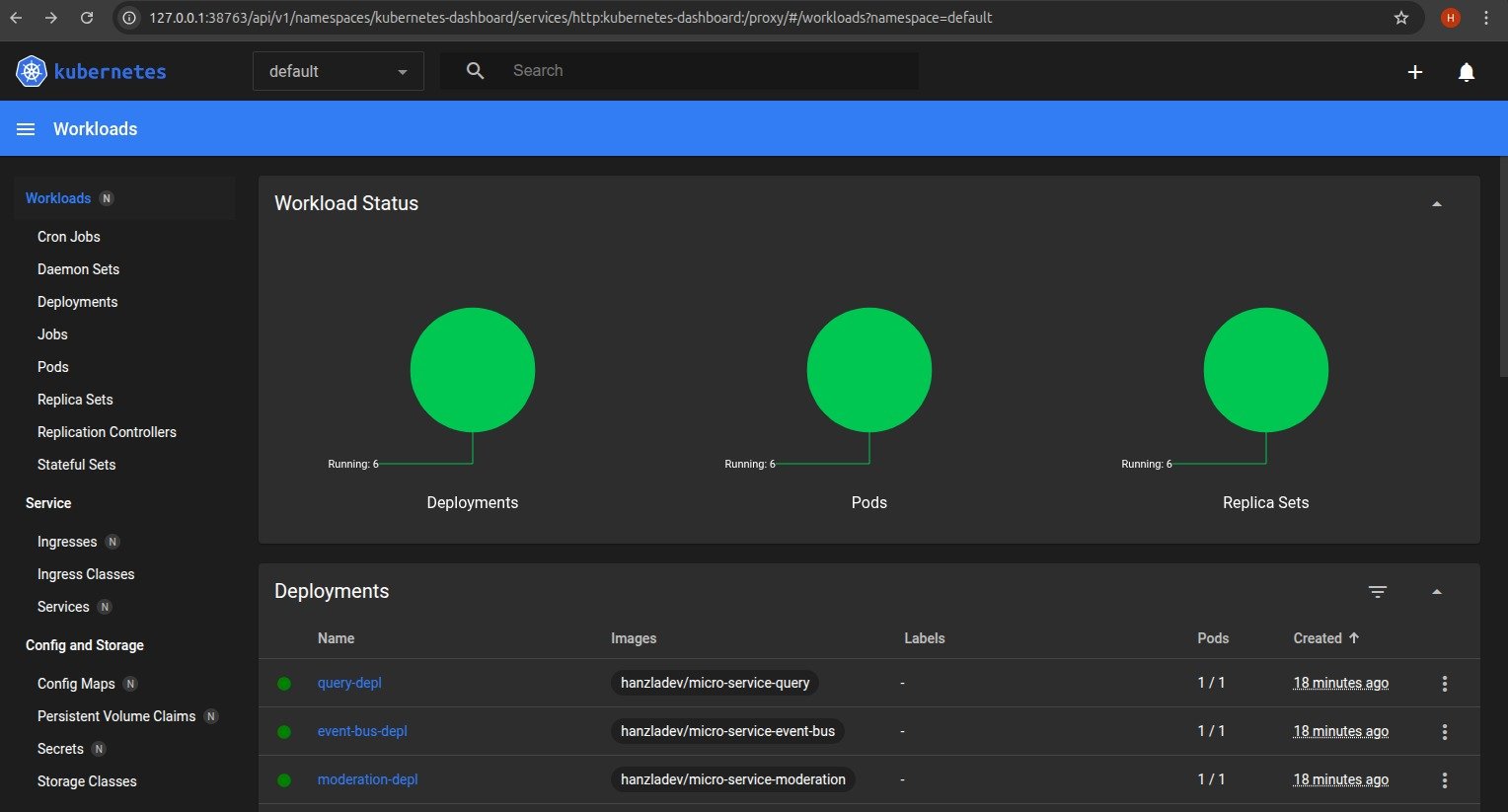
default namespace.
Services We’re Orchestrating
Before diving into Kubernetes concepts, here’s what we’re actually running:
Each of these is an independent Node.js/Express app, containerized with Docker, and pushed to Docker Hub. Kubernetes pulls those images and runs them as pods.
Core Kubernetes Concepts
Pods
A Pod is the smallest deployable unit in Kubernetes. Each pod wraps one container — one service. Pods are ephemeral, meaning they can die and be recreated at any time. Because of this, you never rely on a pod’s IP address directly — it changes every time the pod restarts. This is the problem that Services (ClusterIP) solve, which we’ll cover next.Deployments
A Deployment tells Kubernetes how to run a pod — which Docker image to use, how many replicas to maintain, and what to do when you push an update. Each of our 6 services has its own deployment YAML file underinfra/k8s/.
Here’s the deployment config for the Posts Service:
replicas: 1— we’re running one instance of each service. In production you’d increase this for high availability.imagePullPolicy: Always— Kubernetes always pulls the latest image from Docker Hub on every pod restart. This is critical during development so your changes are always reflected.
Services (ClusterIP)
Since pod IPs change on every restart, Kubernetes Services provide a stable DNS name that always routes to the correct pod — regardless of how many times it’s been recreated. We use ClusterIP services, which means they’re only accessible inside the cluster. This is what enables our microservices to talk to each other securely by name:
So instead of
http://10.108.42.7:4005/events (which would break on restart), the event bus is always reachable at http://event-bus-srv:4005/events. Clean, stable, and Kubernetes handles the DNS resolution automatically.
Here’s what a combined Deployment + ClusterIP Service config looks like:
selector: app: event-bus is what links the Service to the correct pod — it’s a label-based lookup that Kubernetes resolves automatically.
Ingress (NGINX)
ClusterIP services are internal only — the browser can’t reach them directly. Ingress is the single entry point for all external HTTP traffic. It acts as a reverse proxy, inspecting the incoming URL path and routing to the correct internal service. We use the NGINX Ingress Controller with the following routing rules under theposts.com host:
posts.com/posts/create→ Posts Serviceposts.com/posts/abc123/comments→ Comments Serviceposts.com/posts→ Query Service (read all posts)posts.com/→ React Client
Docker Images on Docker Hub
Each service is built into a Docker image and pushed to Docker Hub before Kubernetes can pull and run it. Our images:node:20-alpine as the base image — lightweight and fast to pull:
Deployment Flow
Here’s the full lifecycle of pushing a code change to a running pod:Full Architecture — How Everything Works Together
Request Flow: Creating a Comment
This is the most complex flow in the system — it touches 5 of the 6 services:- User submits a comment in the React client
- Client → Ingress → Comments Service
POST /posts/:id/comments - Comments Service creates comment with status
pending - Comments Service emits
CommentCreated→ Event Bus - Event Bus broadcasts to all services
- Moderation Service receives
CommentCreated, checks for banned words - Moderation emits
CommentModerated(approved/rejected) → Event Bus - Event Bus broadcasts to all services
- Comments Service receives
CommentModerated, updates comment status - Comments Service emits
CommentUpdated→ Event Bus - Query Service receives
CommentUpdated, updates its aggregated data store - Client re-fetches from Query Service and renders the updated comment
Event Types Reference
Why the Query Service Exists
In a naive microservices setup, the frontend would need to call the Posts Service for posts, then loop through each post and call the Comments Service for comments. That’s N+1 network requests — and if either service is down, the whole page breaks. The Query Service solves this by listening to all events and maintaining a denormalized, pre-aggregated view of the data:GET /posts and gets everything it needs. This is the CQRS pattern (Command Query Responsibility Segregation) — separate services for writing data vs reading data.
Event Sourcing on Restart
When the Query Service restarts, it loses its in-memory data. To recover, it callsGET /events on the Event Bus which returns the full event history, and replays every event to rebuild its state from scratch. This is event sourcing — the event log is the source of truth, not the service’s local state.
Getting Started
Prerequisites
- Docker Desktop installed (with Kubernetes enabled)
kubectlCLI tool- NGINX Ingress Controller installed
Setup Steps
1. Build and push all Docker images:posts.com to your hosts file:
On Linux/Mac, edit /etc/hosts. On Windows, edit C:\Windows\System32\drivers\etc\hosts:
http://posts.com in your browser.
Key Concepts Summary
What This Is Not (Yet)
This is a learning project built to understand microservices fundamentals. In a production system you’d add:- Persistent databases (MongoDB, PostgreSQL) instead of in-memory storage
- A proper message broker (NATS, RabbitMQ, Kafka) instead of the custom event bus
- Authentication and authorization across services
- Distributed tracing (Jaeger, Zipkin) to debug cross-service flows
- Monitoring and alerting (Prometheus, Grafana)
- CI/CD pipeline for automated builds and deployments
- Multiple replicas per service for true high availability
The moderation service rejects any comment containing the word “orange” — this is intentionally simplified. In a real system you’d call an external moderation API or run an ML model here instead.